The History / Notes tab displays
the service history and notes associated with the Asset.
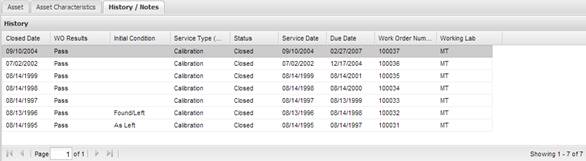
This grid shows all service events (Work Orders) recorded against this Asset. To view the event, double click the selected history event and MET/TEAM displays the Work Order. All history events are read only and cannot be changed by the user.
To add or modify any of the information in the Notes section, use the key combination ALT+Q. The quick note Select Note dialog is displayed. For a complete description of the quick note functionality refer to the section Quick Notes.
· Accuracy Notes – Brought forward from the Asset Type file. The notes can be modified for this specific Asset if required here.
·
Uncertainty Notes – Enter
uncertainty notes. They will be brought forward from Types, but can be changed
for individual Assets if needed.
· Warranty Notes – Specific notes about the warranty for this Asset can be entered here.
· Notes – These are general notes for this Asset.
These notes fields may be auto-filled with text that has been entered on Work Order. If changes are made on the Work Order, there are options to either update the Asset data, or leave as is. Refer to the System Default “Work Order – Update Notes” for more details.