The Section Status button at the top of the Work Order screen is only used in conjunction with MET/CAL related procedures. More specifically the feature is linked to a MET/TEAM procedure defined with the category of “MET/CAL”, that includes a Data Sheet that is a MET/CAL Procedure Executable generated using tagged sections. If the Work Order includes results collected with such a procedure, the menu option is enabled.

Procedure sections are defined by special comments embedded in the MET/CAL procedure. The comments describe sections of the procedure that can be individually executed or skipped when launched by the MET/CAL Runtime. This feature allows users to run a calibration at different times or in different physical locations and automatically link all of the results to a single Work Order. Review the MET/CAL Editor Help for more information on how to use Procedure Sections.
When the button is selected, the Procedure Section Status screen is displayed with columns of section information extracted from the procedure. Section details for all unique procedures are listed in this table. If the same procedure is executed multiple times there is only one instance of the section details for that procedure. The Execution flag for a section will be active if the section was run 1 or more times for any of the procedures.
The fields cannot be edited on this screen. The original MET/CAL procedure must be modified and executed again to generate a table with modified information.
Note: The Work Order
cannot change to “Complete” unless
all sections marked as Required have been executed at least 1 time.
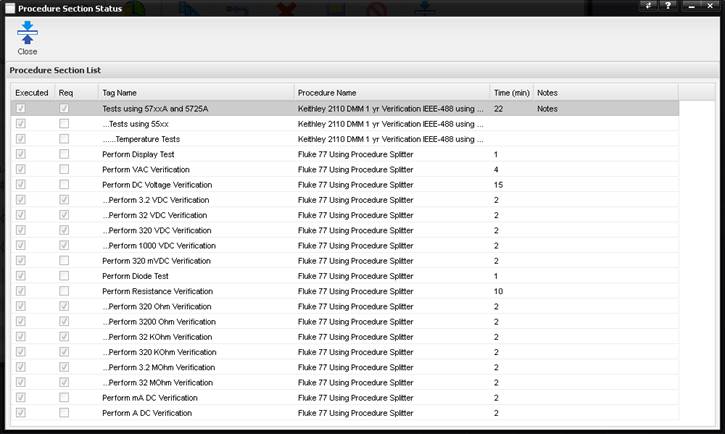
·
Executed -
True/False if the section was run one or more times. Review the Results tab on the Work Order to
determine the total number of times that a section was run.
·
Req -
True/False if the specific section is tagged as being required. The tag of the section is defined in the
original MET/CAL procedure. This section
has to be run eventually.
·
Tag Name –
The name associated with the specific procedure section.
·
Procedure Name
- The name of the MET/TEAM procedure used for the specific section.
·
Time (min) –
The execution time in minutes estimated by the procedure writer (not actual run
times).
·
Notes -
Notes associated with the specific MET/CAL Procedure Section.