The Sub Contractor tab is for capturing information about the sub contractor and any notes concerning the sub contractor. The changes will be reflected on the Work Order Sub Contractor tab once the Process button is selected. This tab must be the active tab when the Process button is selected.
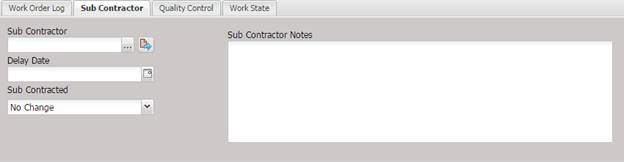
· Sub Contractor – The facility that the Work Orders will be subcontracted to.
o
The Sub Contractor
can be changed by selecting the “…”
button.
o The Sub Contractor can be viewed or edited by selecting the Quick Link button.
· Delay Date – The estimated return date for the Work Orders.
·
Sub Contracted – If the Work Order Sub Contracted checkbox has
changed, select a value from this dropdown.
o
No Change – The
Work Order Sub Contracted check box remains in its current state. No change is
made due to the Batch Change process.
o
Yes - The Work
Order Sub Contracted check box is checked for all Work Orders being changed
through this Batch Change process.
o
No - The Work
Order Sub Contracted check box is not checked for all Work Orders being changed
through this Batch Change process.
·
Sub Contractor Notes – The notes for any Sub Contractor.