The Procedures tab shows the
service procedures that have been defined for this Type.
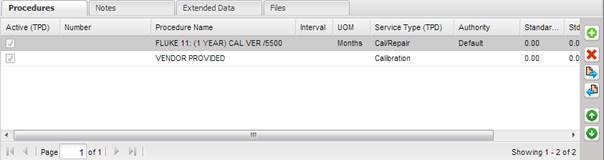
The buttons to the right of the grid can be used to add, delete, modify, view, or reorder the procedure information. Use the “↑” and “↓” arrows to reorder the procedures by priority. The top-most procedure in the list is considered the default procedure (if the top-most procedure is active) when a Work Order is created by receiving an asset. However, if the top-most procedure is not active, the top-most active procedure in the list is used. Inactive procedures should be moved to the bottom of the list using the “↑” and “↓” arrows, but this is up to the discretion of the user.
To add a procedure, select the “+” button on the right side.
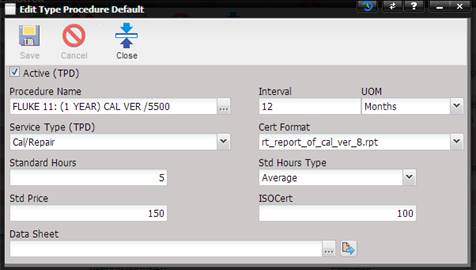
· Active (TPD) – Marks this Procedure as active allowing users to select it during maintenance. (TPD) represents that the Active checkbox is from the Type Procedure Default screen.
· Procedure Name – The name of the Procedure. Procedures cannot be added from this screen. They must be added from the Maintenance -> Procedure menu option.
o The Procedure can be selected or changed by selecting the “…”button.
· Interval – The duration used to calculate the date when the next service should be performed.
· UOM – The unit of measure for the interval.
· Service Type (TPD) – Defines the name of the service for this Procedure. (TPD) represents that the Service Type is from the Type Procedure Default screen.
Note: Service Type cannot
be customized. The values in this dropdown are setup using the Setup menu
Services submenu screen. The order of the Service Types in the dropdown is
based on which Service Type was edited last using the Setup menu Services
submenu.
· Cert Format – Contains the report file name for this Procedure.
· Standard Hours – The number of hours needed to perform this service.
· Std Hours Type – The type of standard hours: Average, Calculated, Manufacturer, and Default.
· Std. Price – The cost of performing the service.
· ISOCert – The cost for an ISO related service. This cost is added if the ISOCert check box is selected on the Work Order.
· Data Sheet – The name of the file used to record measurement points called out in the Procedure. The actual readings are stored on the Work Order for that maintenance event, not in the template.
o The file can be changed by selecting the “…”button.
o The file can be viewed by selecting the Quick Link button.