The
MET/CAL Security option is for customizing availability of MET/CAL features per
user groups.
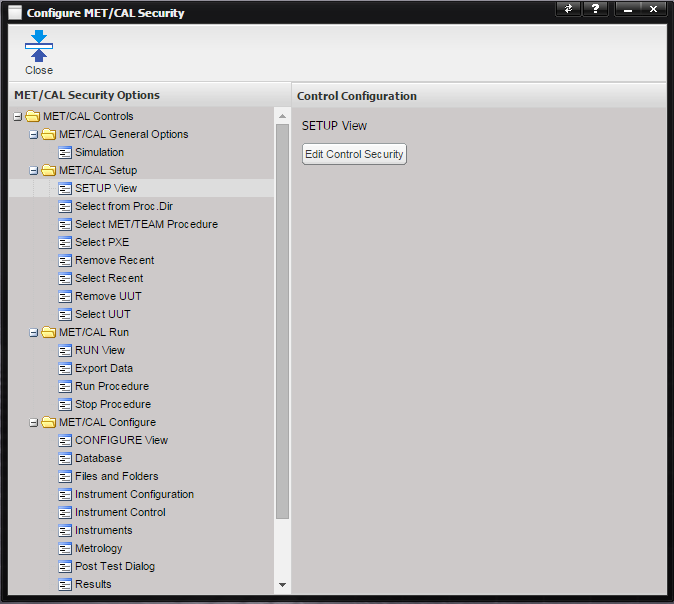
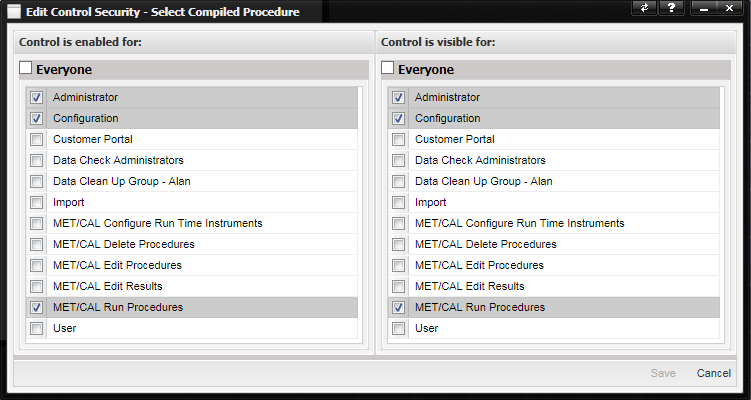
To change the user groups that have access
to MET/CAL features, select the feature from the list on the left and then click
the Edit Control Security button. The Edit Control Security dialog is displayed
for selecting which user
groups the control is enabled and/or visible for.
To set
visibility and enabled/disabled state of the entire SETUP view in the MET/CAL
Runtime application, select the SETUP View item under the MET/CAL Setup node. The
features listed under the MET/CAL Setup node represent the controls on the
SETUP view.
To set
visibility and enabled/disabled state of the entire RUN view in the MET/CAL
Runtime application, select the RUN View item under the MET/CAL Run node. The
features listed under the MET/CAL Run node represent the controls on the RUN
view.
To set
visibility and enabled/disabled state of the entire CONFIGURE view in the
MET/CAL Runtime application, select the CONFIGURE View item under the MET/CAL
Configure node. The features listed under the MET/CAL Configure node represent
the pages available on the CONFIGURE view in the MET/CAL Runtime application and
the Tools > MET/CAL Configuration settings in the MET/CAL Editor application
(as applicable).
Note: Security settings only apply
to features that are listed below open folder nodes and are represented by the
blue and white icon. If a folder node is selected, the Edit Control Security
button is disabled.