Workflow Menu
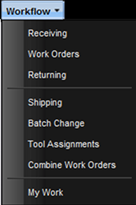
The Workflow menu is used for initiating and processing Work Orders, batch changing Work Orders, tracking locations of Assets that have been loaned to others, and track technician time.
·
Receiving
– Used to receive Assets into the maintenance facility by creating work
orders. The receiving process is a batch process allowing for quick and
efficient induction of equipment into the maintenance facility.
· Work Orders – Used to collect and process maintenance data and actions against open Work Orders.
· Returning – Used to close open Work Orders for Assets that have had maintenance completed.
Note: This action will make the Work Order process a history event.
· Shipping – Used to ship Assets and other items to facilities.
· Batch Change – Used to change multiple Work Orders at one time. Log notes can be added, Work Orders can be subcontracted or QA approvals can be done.
· Tool Assignments – Used to track the process of loaning Assets to contacts. Provides a complete history for both Assets and contacts.
· Combined Work Orders – Used to combine Work Orders.
· My Work – Used by a technician to add or modify their time and view assigned Work Orders.