Maintenance Menu
The Maintenance menu is for creating, editing, and managing Assets, customers, job numbers, manual templates, files, accreditations, and data cleanup.
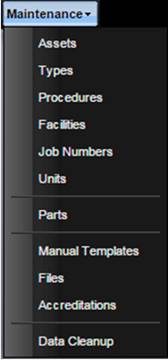
·
Assets –
Used to add, edit, delete and manage Assets. Assets are individual pieces of
equipment that are derived from Types.
· Types – Used to add, edit, delete and manage types. Types are general characteristics of an object, like catalog items.
· Procedures – Used to add, edit, delete and manage procedures. Procedures are the instructions used for performing actions.
· Facilities – Used to add, edit, delete and manage facilities. Facilities are any entities such as customers, manufacturers, sub-contractors, and labs.
· Job Numbers – Used to add, edit, delete and manage job numbers. Job numbers (P.O. numbers) are funding lines of credit attached to one or more facilities.
· Units – Used to add, edit, delete, and manage prefix and base units.
· Parts – Used to add, edit, delete and manage parts.
· Manual Templates – Used to create and modify templates where manual data point collection will be entered.
· Files – Used to add external files to MET/TEAM. These files can be referenced or attached to maintenance events. These files are stored in the database removing any external management.
·
Accreditations
– Allows the user to enter Accreditations or Traceability information
referenced by maintenance events.
·
Data
Cleanup – Used to consolidate records that are considered duplicates and to
delete record that are marked for deletion but have not been removed from the
database.