Management Menu
The
Management menu is for managing the business and performing financial tasks.
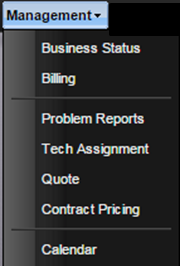
· Business Status – Facility managers use this dialog to manage and review many aspects of the Facility and its workload. Use this function to identify opportunities within the Service Facility.
· Billing – Used to generate invoices for customers.
Note: Enabled when valid
MET/TEAM Commerce module licenses exist.
· Problem Reports – Used to document and track issues in the Facility that may be incorrect or need improvement. Typically, a problem is reported by a technician for a procedure or a type and the follow-up is done by a manager or QA person.
· Tech Assignment – Used to assign, un-assign, and modify Work Orders to technicians. Combined with standard hours, this interface displays how much work each technician has been assigned ensuring a complete day’s work.
· Quote –Used to create quotes for customers based on Types.
Note: Enabled when valid
MET/TEAM Commerce module licenses exist.
· Contract Pricing –Used to manage contract pricing for customers.
Note: Enabled when valid
MET/TEAM Commerce module licenses exist.
· Calendar – Used by the facility to track facility wide appointments and tasks.