File Menu
The File menu is used for logging off, importing data, and initiating Mobile Check In or Check Out.
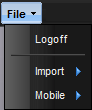
· Logoff – Allows the user to log off without exiting MET/TEAM.
· Import – Allows importing of data into MET/TEAM.
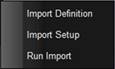
Import Definition – Creates an import definition data file.
Import Setup – Creates a new import setup file.
Run Import – Processes the data to be imported using the import definition file and import setup file.
· Mobile – This menu item is only available when valid licenses exist for MET/TEAM Mobile.
 or
or

Check In – With MET/TEAM Mobile the user can check in data collected or modified while working on site (If not visible, data is currently checked in). This menu option only appears when running a Mobile instance of MET/TEAM.
Check Out – With MET/TEAM Mobile the user can check out data for the maintenance facility and go on site working as a standalone member of the maintenance facility (If not visible, data is currently checked out). This menu option only appears when running a Mobile instance of MET/TEAM.