The Users menu is used to add, remove, modify, and manage user information, security access, and lab access.
Note: Only Administrators can add Users.
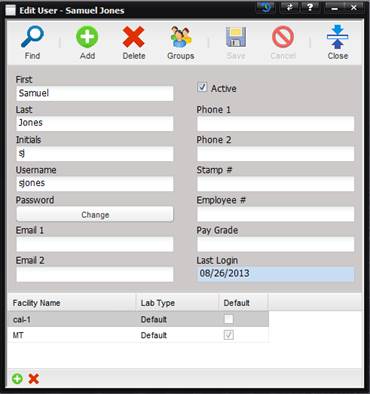
- First – First name of the User.
- Last – Last Name of the User.
- Initials – The User’s initials. Initials are used for the calibration sticker.
- Username – Name given to the User to log on to MET/TEAM.
- Password – The User’s password. This value cannot be seen by anyone, including the administrator. There are no minimum or maximum length requirements for passwords.
- If the User has forgotten his/her password, the User can change his/her password when logging in. See the Help section “Change Password from Log-In”.
- An Administrator can also reset the User’s password from the edit User screen by pressing the Change button.
- Email 1 – The User’s primary email address.
- Email 2 – The User’s alternate email address.
- Active – If checked, the User name appears in the drop down lists.
- Phone 1 – The User’s primary phone number.
- Phone 2 – The User’s alternate phone number.
- Stamp # – Stamp number issued to the User.
- Pay Grade – Pay grade of the User.
- Employee # – The number the employee is given by the employer.
- Last Login – The date and time that the User last logged in to MET/TEAM.