The Facility Grid contains the Facilities that this Contact is associated with and the Recall Escalation attributes for the Facility.
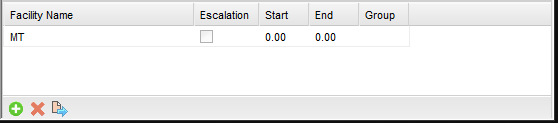
Contacts are added to Facilities by selecting the “+” (add) button.
Contacts are removed from a Facility by selecting the “X” (delete) button.
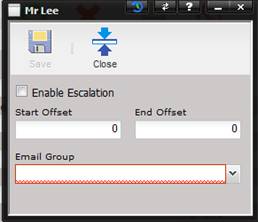
To modify the Recall Escalation
parameters for a specific Facility for this contact, highlight the contact in
the Facility Grid and select the Quick Link button. The Escalation dialog is
displayed.
·
Enable Escalation
– If checked, this Contact is active for receiving email escalations.
·
Start Offset –
The number of days from the Report Date to start the recall. Negative numbers
can be used.
·
End Offset –
The number of days after the Report Date to end the recall span.
·
Email Group –
The escalation group (monthly, quarterly, yearly) this Contact belongs to for
email sending.