The Add Contact screen allows the user to enter information related to a Contact for a Facility.
Note: Only Administrators or Configurators can add
Contacts.
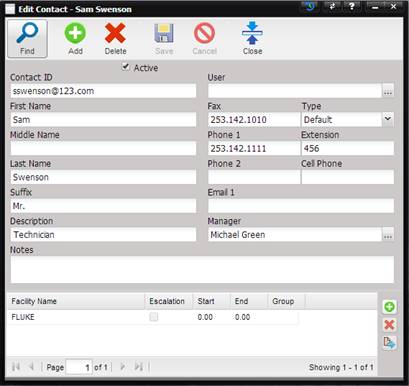
·
Active –
Marks the Contact as active.
·
Contact ID (required) – Unique identification for the Contact.
·
First Name –
First name of the Contact.
·
Middle Name –
Middle name of the Contact.
·
Last Name –
Last name of the Contact.
·
Suffix –
Suffix associated with the last name.
·
Description –
A description of the Contact type.
·
User – The
User associated with this Contact. A User is someone who can login to the
MET/TEAM application.
o
The User can be
changed by selecting the “…” button.
o
When the User is
selected, the First Name, Last Name, Phone 1, Phone 2, and Email 1 are filled
in from the User information. This information does not overwrite what
currently exists on the Contact screen. The Facility grid will be populated once the
Save button is selected.
·
Fax –
Facsimile number of the Contact.
·
Type – Pick
list defining the type of Contact.
·
Phone 1 –
Primary phone number of the Contact.
·
Extension –
Extension number of the Contact.
·
Phone 2 –
Secondary phone number of the Contact.
·
Cell Phone –
Mobile phone number of` the Contact.
·
Manager –
Supervisor for this Contact. The supervisor must be saved as a Contact.
o
The Manager can
be changed by selecting the “…” button.
·
Email 1 –
Primary email address of the Contact.
·
Notes –
Notes about the Contact.