The Parent tab is located on the top row of tabs underneath the Tool Bar. The Parent tab title displays the name of the parent Facility name for quick reference. Information found on the Parent tab is read-only except for the Facility Name.
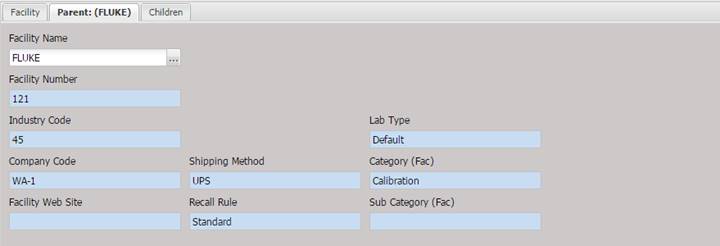
· Facility Name – The name of the parent Facility. The name should be unique.
· The Facility Name can be changed by selecting the “…” button.
· Facility Number – The number issued to the parent Facility. Could be a lab code, customer number, or other identifier.
· Industry Code – The code identifying this location within an industry, such as CAGE code.
· Company Code – The code used to identify this Facility within a company.
· Facility Web Site – The parent Facility URL address on the internet.
· Shipping Method – The desired mode of shipment (user definable).
· Recall Rule – The default recall rule used for this parent Facility, standard choices include; Standard, End of Month, Beginning of Month, Previous Sunday.
· Lab Type – System defined list of laboratory types (only used if the facility is a lab).
· Category (Fac) – The general category of the facility.
· Sub Category (Fac) – The sub category of the facility.