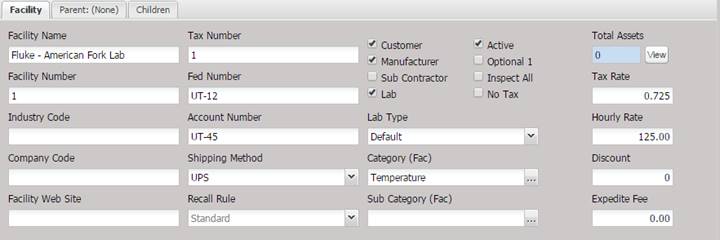
The Facility tab contains general information about the Facility that is being added, viewed, or modified.
·
Facility
Name (required) – The name of the Facility. We recommend the name be
unique.
· Tax Number – The Facility’s state or local tax number.
· Facility Number – The number issued to the Facility. This number could be a lab code, customer number, or other identifier.
· Fed Number – The Facility’s federal tax id number.
· Industry Code – The code identifying this location within an industry, such as CAGE code.
· Account Number – The account number that can be linked to a bookkeeping system.
· Company Code – The code used to identify this Facility within a company.
· Shipping Method – The desired mode of shipment (user definable).
· Facility Web Site – The Facilities URL address on the internet.
· Recall Rule – The default recall rule used for this customer, standard choices include; Standard, End of Month, Beginning of Month, Previous Sunday. The recall rule will set the due date as described by the standard choices.
o Standard – uses the interval only.
Example: If the Service Date is 10/11/2012
and the interval is 12 months, the Due Date should be 10/11/2013.
o Standard/No Print – uses the interval only. Does not print the Due Date on the certificate report.
o End of Month – extends the calibration due date to the end of the month.
Example: If the Service Date is 10/11/2012 and the interval is 12 months, the Due Date should be 10/31/2013.
o Beginning of month – reduces the calibration cycle to the beginning of the month.
Example: if the Service Date is 10/11/2012
and the interval is 12 months, the Due Date should be 10/1/2013.
o Previous Sunday – reduces the calibration cycle to the previous Sunday.
Example: if the Service Date is 10/11/2012 and the interval is 12 months, the Due Date should be 10/6/2013.
· Customer – Check if this Facility is a customer of the service facility. Enables the Tax Rate field. This checkbox cannot be customized because the functionality is associated with the Tax Rate field on this screen.
· Manufacturer – Check if this Facility is a manufacturer of equipment.
· Sub Contractor – Check if this Facility is a valid sub contractor.
· Lab – Check if this Facility is another calibration lab. This checkbox cannot be customized because the functionality is associated with the Inspect All field on this screen.
Note: A minimum of one Facility Type (Customer, Manufacturer, Sub
Contractor, or Lab) must be selected prior to saving the Facility.
· Active – Check if this is an active Facility. If unchecked, this Facility is considered inactive and is not displayed in pick lists.
· Optional 1 – Optional check box to be used for tracking Facility data.
· Inspect All – Check if this Facility requires inspection of all Assets.
· No Tax – Check if this Facility is exempt from tax application. This checkbox cannot be customized because the functionality is associated with the Tax Rate on this screen.
· Lab Type – System defined list of laboratory types (only used if the Facility is a lab).
· Category (Fac) – The general category of the Facility.
· Sub Category (Fac) – The sub category of the Facility.
· Total Assets – Displays the total number of Assets currently being tracked by MET/TEAM assigned to this Facility. This number includes active and inactive Assets. S
o Selecting the View button displays a Crystal Report inventory list.
· Tax Rate – The rate of tax charged for services and goods sold. This field is enabled only when the facility is classified as a customer.
·
Hourly
Rate – Hourly Rate charged toward this Facility.
·
Discount–
Discount applied to this Facility.
· Expedite Fee– Fee charged per Asset to expedite for this Facility.
Note: Concerning Hourly Rate, Discount
and Expedite Fee fields:
The Facility screen overrides the
Lab Defaults. If any of the Hourly Rate, Discount and Expedite Fee fields are
blank or set to “0” the Lab Defaults are used.