The Addresses tab displays the physical addresses of the
Facility. Many facilities have different billing and shipping addresses and
MET/TEAM supports multiple addresses per facility. Grid records can be sorted by ascending or
descending order by clicking on the header of the column.
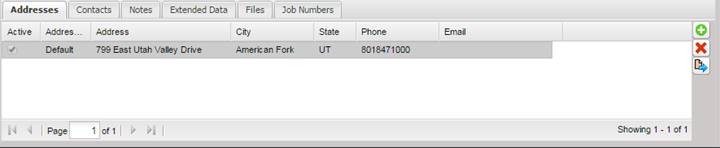
The buttons to the right of the grid can be used to add, delete, or modify the address information.
When adding an address, the Address dialog is displayed.
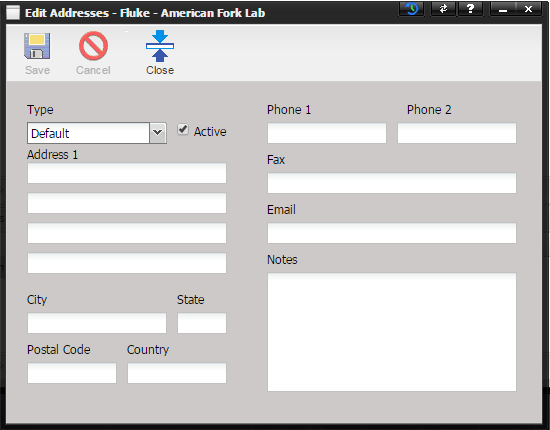
· Type – The type of address you are adding. Different contact types can be defined and then are used for specific reasons. Address types may include such choices as billing, shipping, or default.
· Active – Marks the address as active or inactive.
· Address 1 – The physical address of the facility. Four lines are included to support government or military facilities.
· City – The city of the facility.
· State – The state of the facility.
· Zip – The Zip code of the facility (a postal code can be entered here as well).
· Country – The country of the facility.
· Phone 1 – The primary phone number of the facility.
· Phone 2 – The secondary phone number of the facility.
· Fax – The facsimile number of the facility.
· Email – The Email address of the facility (this field could also be used to store additional web site information such as technical support, or customer service).
· Notes – Notes for this facility address.