Some fields in MET/TEAM do not allow auto lookup due to additional functionality and business rules that occur when information is added to these fields. This additional functionality and business rules takes place when the “…” is used and the Find screen is displayed. Therefore, the following list of fields have been disabled from the Auto Lookup capability.
These excluded fields are designated on the screens with a grayish background color.
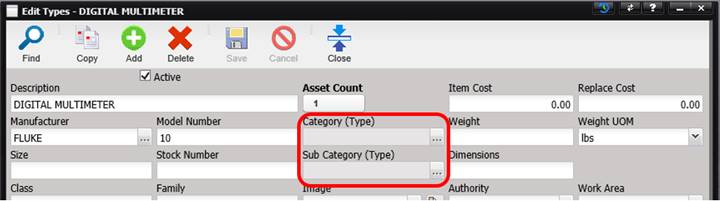
Note: The following
fields on the specified screens do not allow auto lookup.
|
Screen Name |
Field |
|
Schedule Alert |
Alert Parameter Sheet |
|
Receiving |
Department Job Number Category and Sub Category |
|
Work Order |
Job Number Procedure Used Data Sheet Category and Sub Category Job Number (on the Parts tab when using the “+”
button, selecting an existing part and the Parts screen is displayed) |
|
Add Labor (when accessed from either Work Order or
My Work) |
Job Number Category and Sub Category |
|
Assets |
Category and Sub Category Department |
|
Edit Asset Service |
Service Type |
|
Types |
Category and Sub Category |
|
Procedures |
Category |
|
Facilities |
Category and Sub Category |
|
Parts |
Category |
|
Accreditation |
Category and Sub Category |
|
Business Status |
Department |
|
Billing/Invoicing |
Job Number (on the Invoice screen) Job Number (when adding a Part to the invoice using
the “+” button, selecting an existing part and the Parts screen is displayed) |
|
Contract Pricing |
Type Procedure Default |
|
Problem Report |
Work Order (when in Add mode) Procedure Customer (when in Add mode) Type (when in Add mode) |
|
Quote |
Work Order Procedure (on Create Quote Item-Type) |
|
Recall |
Department |