MET/TEAM includes the ability to perform auto lookups on fields that have the “…” button by typing the beginning letters of the information you wish to use to fill in the field. As you type, matching suggestions are presented below or above the field. Use keyboard up and down arrows to navigate to your highlight your selection. Use the Enter key or click the highlighted item to accept your selection and display it in the field. If no selection is made, the field reverts to what was in the field prior to typing.
The following screenshot shows an example. The more that is typed, the finer the selection suggestions. The scroll bar allows for scrolling the selection.
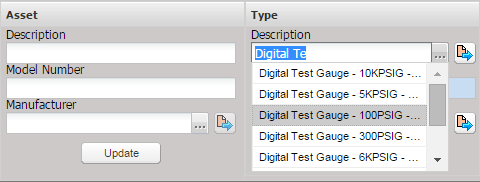
The generated matching suggestions are defined by the field configuration page which is located under the Maintenance menu Data Tool submenu and then by selecting the Configure button.