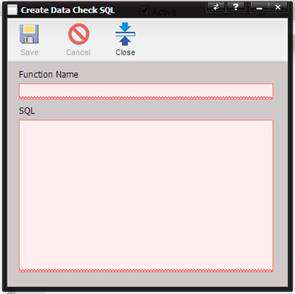
To execute SQL statements from within a Data Check, define the SQL string using the Data Check SQL page.
·
Function Name – The user-friendly name which
invokes the SQL statement from within JavaScript.
·
SQL – The actual SQL statement to be execute.
The buttons on top of the screen perform multiple functions.
Save – Saves the Data Check SQL record.
Cancel – Erases any changes you may have made.
Close – Closes the Data Check SQL page.
The following list contains special string-replace keys for use within SQL statements. This token system provides enhanced security while enabling the ability to access needed information.
strUID – This token is replaced with the UID (Unique Identification) number of the current record the Data Check is being run against.
strAlertUID – This token is replaced with the UID of the currently running Email Alert. This token is only applicable for SQL run through the Email Alert Engine, otherwise it returns a -1.
strUserUID – This token is replaced with the UID of the currently logged in user.
strActiveFacilityUID – This token is replaced with the UID of the facility the current user is logged into.