Quick Notes
can be added by selecting the Add button. The Add Note dialog is displayed. 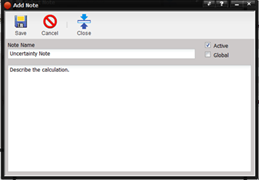
·
Note Name – The
title or name of the note.
·
Active – If
checked, the Quick Note is available for use throughout MET/TEAM. If unchecked,
the Note is no available.
·
Global – If
checked when creating a Quick Note, the user can decide whether or not the
Quick Note is accessible to all note controls or only to the note control that
was selected when the Quick Note was added. If the “Global” check box is
checked, the Quick Note is available for all note boxes. If the checkbox is
unchecked, the Quick Note is only available for note area that the user was in
when the Quick Note was created. The “Global” checkbox is disabled once the
Quick Note is saved.
· Text Box – The area where the text that will be displayed for this note is typed.