Traceability
information, such as NIST numbers are entered here and then referenced by
service events, reducing the amount of data entry required. Accreditation
information such as A2LA certifications can also be added here and referenced
by maintenance events.
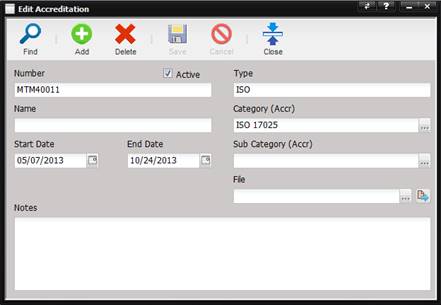
·
Active –
Marks the item active or in-active. Inactive items are not selectable by the
technician.
·
Number – The
reference number of the accreditation or traceable document.
·
Name – The
name of the accreditation or traceable document.
·
Start Date –
Date the accreditation begins.
o
For a date
picker, select the calendar button.
·
End Date –
Date the accreditation expires.
o
For a date
picker, select the calendar button.
·
Type – Type
of accreditation or traceability.
·
Category (Accr)
– Category of the accreditation or traceable document.
o
The category can
be changed by selecting the “…” button.
·
Sub Category (Accr)
– Sub Category of the accreditation or traceable document.
o
The sub category
can be changed by selecting the “…”
button.
·
File – Name
of the physical document. This document can be stored in the database and
reproduced with other certifications on service events.
o
The file can be
changed by selecting the “…” button.
o
The File can be
viewed by selecting the Quick Link
button.
·
Notes –
Allows the user to enter notes or actual information from the accreditation or
traceable document.