The Services
option is for adding or editing Service Types. When
adding Service Types, the Save is case-insensitive.
Note: The last service edited is the first Service
Type displayed in all Service Type dropdown lists. The Service Type dropdown
lists appear on the Work Order, Receiving, Procedure and Type Procedure
Defaults screens.
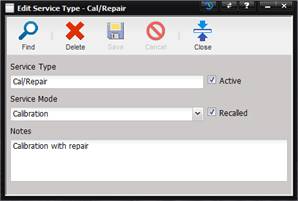
· Service Type – The name of the service type such as ‘Cal/Repair’, ‘Calibration’, ‘PM’, ‘Repair’.
· Active – If checked, the Service Type is visible in other parts of MET/TEAM. Service Type is selectable from a non-editable dropdown on the Work Order, Receiving, Procedures, and Type Procedures screen.
Note: Service Type can only be customized by using the Setup menu
Services submenu screen.
· Service Mode – The mode of service being created (‘Calibration’, ‘Unscheduled’, and ‘Preventative Maintenance’).
· Recalled – If checked, this service type is used when determining recall notices. A Service Mode must be checked as Recalled to be used in the Assets Scheduled Services grid.
· Notes – Notes pertaining to the service type.
· Highest level of access, no restrictions.
Note: When saving a Service Type, the Save is case-insensitive. For example:
“Calibration” and “calibration” are the same and only one Service Type of
Service Mode “Calibration” can be exist.