To review completed Imports, select the Run Import menu option. The Find screen is displayed. Enter search criteria and select the OK button to open the desired import.
Select the View Log button to review the log.
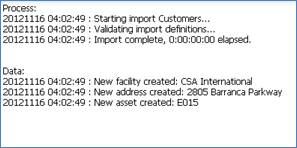
The log is downloaded as a text file or opened inside your browser, depending on the type of browser and settings.
The top section “Process” displays the steps performed during the import. The bottom section “Data” displays a list of new items created and/or existing items updated.