The Received Assets portion of the Receiving screen displays a list of Assets to be received and for which open Work Orders will be created.
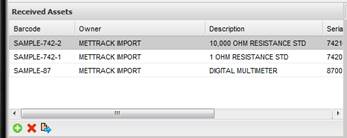
The Asset highlighted in grey indicates the currently selected Asset. Information in the Asset Details grid and the Asset Extended Data grid reference the currently selected Asset.
To add an Asset, select the “+” button, select the Asset(s) from the Find dialog, then select OK button to add them to this group.
To remove an Asset, select the “X” delete button.
To modify/view the highlighted Asset, select the Quick Link button.