The Procedures menu allows for adding or modifying instructions used to perform and record specific service actions against Assets within MET/TEAM.
Note: To view Manual
Templates, select the Maintenance menu Manual Template option.
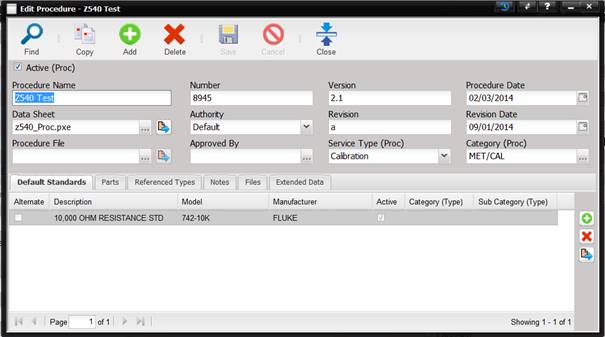
·
Active (Proc)
– Check if this is an active Procedure. If unchecked, this Procedure is
considered inactive and is not displayed in pick lists.
·
Procedure Name
– Name of the Procedure as referenced by the technician.
o
If Procedure
Sectioning is being used with a MET/CAL procedure, the Procedure Name must reference
the instrument line of the procedure.
o
If Procedure
Sections is not being with a MET/CAL procedure, the Procedure Name should
reference the instrument line of the procedure.
·
Number –
Number assigned to the Procedure by the creator of the procedure.
·
Version –
The version of the Procedure
·
Procedure Date –
The date the Procedure was created.
·
Data Sheet –
The file that contains the data point collection mechanism.
o
The data sheet
can be changed by selecting the “…”
button.
o
The data sheet
file can be viewed by selecting the Quick Link
button.
o
If the procedure
is not a MET/CAL procedure, this text box contains the Manual Template name,
Excel spreadsheet file name, or any other file name that is the file generating
the results.
o
If the procedure
is a MET/CAL .PXE procedure, the .PXE file must be imported into the database
as a File and then linked to the Data Sheet field using the “…” button.
o
If the Procedure
Name is the name of the compiled MET/CAL procedure, the data sheet text box
should be left blank.
·
Authority –
The entity that authorized the use of this Procedure.
·
Revision –
The revision of the Procedure.
·
Revision Date –
The date of the revision.
·
Procedure File*
– The name of the external file containing the actual verbiage (instructions)
of the Procedure. Most commonly this data is kept in PDF or DOC formats.
o
The procedure
file can be changed by selecting the “…”button.
o
The procedure
file can be viewed by selecting the Quick Link button.
·
Approved by –
The person authorizing the use of this Procedure.
·
Service Type (Proc) – The type of service the Procedure is used for.
Note: Service Type cannot be
customized. The values in this dropdown are setup using the Setup menu Services
submenu screen. The order of Service Types in the dropdown is based on which
Service Type was edited last using the Setup menu Services submenu.
·
Category (Proc) –
The category of the Procedure.
o
The category can
be changed by selecting the “…”button.
o
When the
procedure is a MET/CAL procedure, the Category must be “MET/CAL”.
§ When using a compiled MET/CAL procedure, the Data
Sheet and the Procedure File fields must be left blank. The Instrument Line of
the compiled procedure must be entered into the Procedure Name field.
§ For compiled procedures, there are no other required
selections. All other fields are user defined.
§ When using compiled procedures, each work station must
be setup to point to the proper procedure directory by editing the procdir
parameter of the metcal.ini file. If the work station cannot locate the desired
procedure an error message is generated when the procedure is launched from
MET/TEAM.
*All procedure
templates and reference files are stored in the database. This allows the local
administrator complete security and version control of the documents.