The Information tab contains information pertaining to the Type.
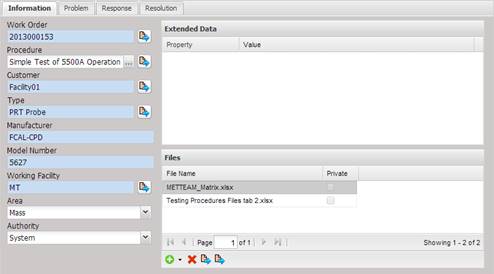
· Work Order – Indicates the Work Order the problem report is referencing.
o When creating a Problem Report, selecting the Work Order will cause the other information to be populated from the Work Order information.
o The Work Order can be selected by selecting the “…” button.
o When the Problem Report is being created, the Work Order can be viewed by selecting the Quick Link button.
· Procedure – Indicates the procedure the problem report is referencing.
o The procedure can be selected or changed by selecting the “…” button.
o The procedure can be viewed by selecting the Quick Link button.
· Customer – The customer who owns the type that the problem report is referencing.
o The customer can be selected by selecting the “…” button.
o The customer can be viewed by selecting the Quick Link button.
· Type – Indicates the Type the problem report is referencing.
o The type can be selected by selecting the “…” button.
o The type can be viewed by or modified by selecting the Quick Link button.
· Manufacturer – Indicates the Manufacturer from the type the report is referencing.
· Model Number – Indicates the Model Number from the type the report is referencing.
· Working Facility – Indicates the facility reporting the problem.
o The working facility can be selected by selecting the “…” button.
o The working facility can be viewed by selecting the Quick Link button.
· Area – Indicates the area of the facility reporting the problem.
· Authority – Indicates the authority of the facility reporting the problem.