Contract
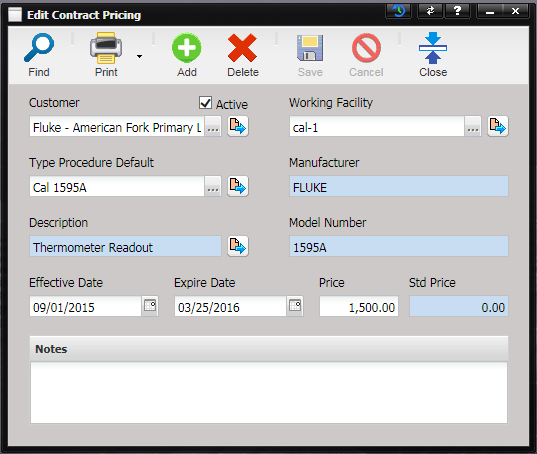
pricing is used to create custom pricing for facilities that are owners. Select
a Customer, a Type/Procedure combination and optionally a Working Facility;
enter Effective and Expire dates, contracted price and any notes. Any Work
Orders matching the customer and Type/Procedure that are opened between the
dates set are charged the contract price instead of the standard price.
Expedite or ISO cert fees and any parts on the Work Order can be added to the
contract price when calculating the Work Order cost.
·
Customer – The
customer that the contract pricing applies to.
·
Active –
Marks the item active or in-active. In-active prices are not used.
·
Working Facility
– Only required if the contract price applies to a specific servicing facility.
If blank, the Servicing Facility is not evaluated.
·
Type Procedure Default – The procedure that the contract pricing applies to.
·
Manufacturer –
The Manufacturer for the type the contract pricing applies to.
·
Description
– The description for the type the contract pricing applies to.
·
Model Number
– The model number for the type the contract pricing applies to.
·
Effective Date – The
date that the contract price becomes effective.
·
Expire Date
– The date that the contract price is no longer in effect.
·
Price – The
new price that applies to the customer and type procedure combination selected.
·
Std Price –
The standard price for the type procedure being adjusted.
·
Notes -
Notes about the contract price.