Many different sections of MET/TEAM allow the use of categories and sub categories to classify information for later retrieval or analysis. Each category defined by the user has its own sub categories, giving the user an infinite number of ways to categorize information within MET/TEAM. (A similar screen is displayed for sub categories.) Categories are context-sensitive, meaning categories that are created for Asset characteristics, for example, do not appear in the list when selecting a category for a part, facility, procedure, etc. By the same token, when selecting or creating sub categories, they are always linked to the currently selected category.
The category
and sub category is specific to the screen it is called from. The snapshot
below is displaying the category for the Asset screen as designated by
“(Asst)”.
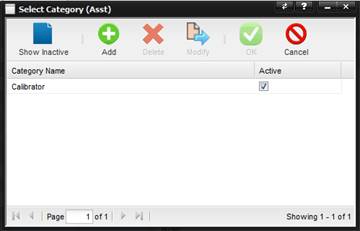
Show Inactive – By default only active categories and sub categories are shown. Categories and sub categories that are no longer needed or desired can be marked as inactive, making them unavailable to be selected. Categories and sub categories referenced in MET/TEAM cannot be deleted without the reference first being removed.
Add – Adds a new category or sub category. By default, new categories and sub categories are always marked as active.
Delete – Deletes a category or sub category. If a category or sub category is referenced in MET/TEAM, a message is displayed stating that the item cannot be deleted and should be marked inactive instead.
Modify – Allows you to change the name and/or active state of the category or sub category.
OK – Selects the highlighted category or sub category.
Cancel – Cancels the choice and returns the user to previous condition.
A simple example of creating categories and sub categories for Asset characteristics may look something like this:
·
Category:
Electrical
o
Sub categories:
DMM, Oscilloscope, Power Meter, Ammeter, etc.
·
Category:
Temperature
o
Sub categories:
Readout, Bath, Furnace, Dry Block, Fixed-Point Cell, etc.
·
Category:
Pressure
o
Sub categories:
Controller, Piston Gauge, Deadweight Tester, etc.