The Labor screen appears when adding labor from the Work Order Labor/Files tab and from the My Work screen.
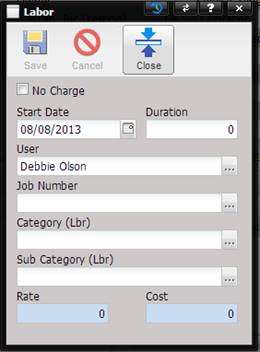
· No Charge – Tells the system when calculating labor costs, this time entry should not be included in the labor charge. This check box cannot be customized because the functionality is associated with the calculated Cost field on this screen.
· Start Date – The date of the time record.
· Duration – The duration of the labor in hours and tenths. This is designed to be entered daily. The maximum value is 24 hours and the minimum is 0.
· User – Name of the person entering the labor record.
o The user can be changed by selecting the “…” button.
· Job Number – The job number this labor is charged to (pre-filled with the Work Order job number)
o The job number can be changed by selecting the “…” button.
· Category (Lbr) –The category of the labor (not required).
o The category can be changed by selecting the “…” button.
· Sub Category (Lbr) – The subcategory of the labor. (not required)
o The sub category can be changed by selecting the “…” button.