Some data is easier selected or filtered in
SQL than by using elaborate formulas from within Crystal Reports. For example,
to obtain the most recent calibration record for an Asset, the following SQL
query can be employed. To use it from a report, it is best wrapped in a
database view or stored procedure.
CREATE VIEW [dbo].[LatestCal]
AS
SELECT
*
FROM
CallSheets
WHERE
tMaintDate =
(
SELECT
MAX(tMaintDate)
FROM
CallSheets c
WHERE
c.lActive
<> 0
AND
c.lDeleted
= 0
AND
c.lClosed
<> 0
AND
c.nAssetUID
= CallSheets.nAssetUID
GROUP BY
c.nAssetUID
)
GO
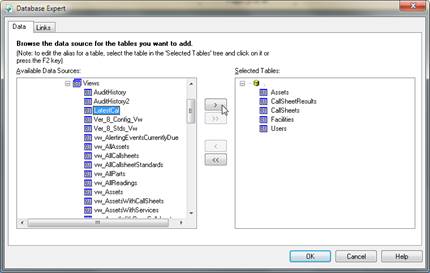
The view is then added to the report via
the Database Expert, in the same fashion as adding tables to a report.
MET/TEAM ships with a number of canned
database views, many of which will make report writing easier since the table
JOINs are already embedded in them and fields like the customer or manufacturer
for an Asset or its type information can be readily accessed as character
fields.
You are encouraged to explore the existing
views as a starting point, in particular vw_CallSheets and
vw_AssetsWithServices.