Run the new query in SQL Server® Management Studio and verify the results show the expected data.
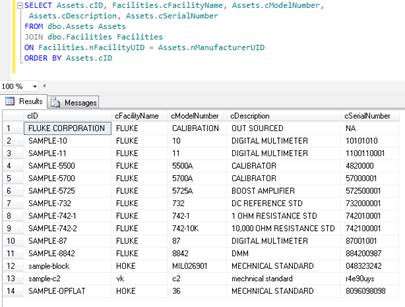
To make it easier to use in Crystal Reports, we can turn the query into a stored procedure, or a view. Furthermore, to make the information clearer, we can alias the column names to be more user friendly:
-- drop the
view if it exists already
IF OBJECT_ID(N'[dbo].[view_basic_inventory_report]', 'V') IS NOT NULL
DROP VIEW
[dbo].[view_basic_inventory_report]
GO
-- create the
view
CREATE VIEW
[dbo].[view_basic_inventory_report]
AS
SELECT
Assets.cID AS [Asset Number],
Facilities.cFacilityName AS [Manufacturer],
Assets.cModelNumber AS [Model],
Assets.cDescription AS [Description],
Assets.cSerialNumber AS [Serial Number]
FROM
dbo.Assets Assets
JOIN
dbo.Facilities Facilities
ON
Facilities.nFacilityUID = Assets.nManufacturerUID
GO
Run the script
in SQL Server® Management Studio.