The Parts option is used to manage expendable items used in the process of service. Parts can be setup using this menu option and then added to Types, Procedures, Work Orders, Quotes, Invoices and Shipments.
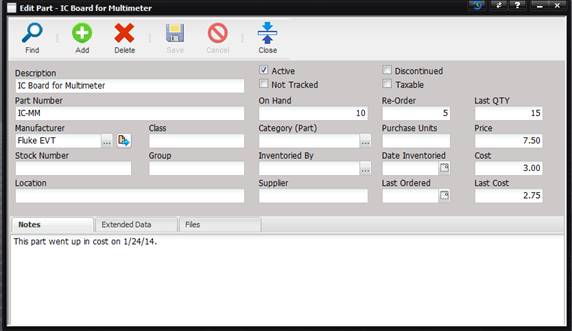
·
Description
– The description of the part.
·
Part Number
– The manufacturer’s number used to order the part.
·
Manufacturer
– The company that makes the part.
·
Class –
Describes the style or type of part.
·
Stock Number
– National Stock Number (NSN) as issued by FedLog.
·
Group –
Allows the user to enter a value to group parts.
·
Location –
The physical location where the part can be found.
·
Active – If
checked, the part is available on the parts pick lists.
·
Not Tracked
– If checked, the part is an expendable item not tracked, such as cotton swabs,
alcohol, etc.
·
Discontinued
– If checked, the manufacturer no longer produces this part.
·
Taxable – If
checked, tax is charged when billing is run.
·
On Hand –
The quantity that is available for use.
·
Re-order –
The part is reordered when the on hand quantity reaches this amount.
·
Last QTY –
The amount last ordered.
·
Category (Part) –
The category of the part.
o
The category can
be changed by selecting the “…” button.
·
Purchase Units –
The way in which this part is purchased.
·
Price – The
amount the customer is charged for this part.
·
Inventoried By –
The name of the person who last inventoried this item.
o
The inventoried
by can be changed by selecting the “…”
button.
o
The list of names
that are selectable comes from the list of users.
·
Date Inventoried –
The date this item was last inventoried.
·
Cost – The
price last paid to purchase this part.
·
Supplier –
The vendor that this part is purchased from.
·
Last Ordered –
The date this item was last ordered.
·
Last Cost –
The amount the service facility paid the last time the part was purchased.